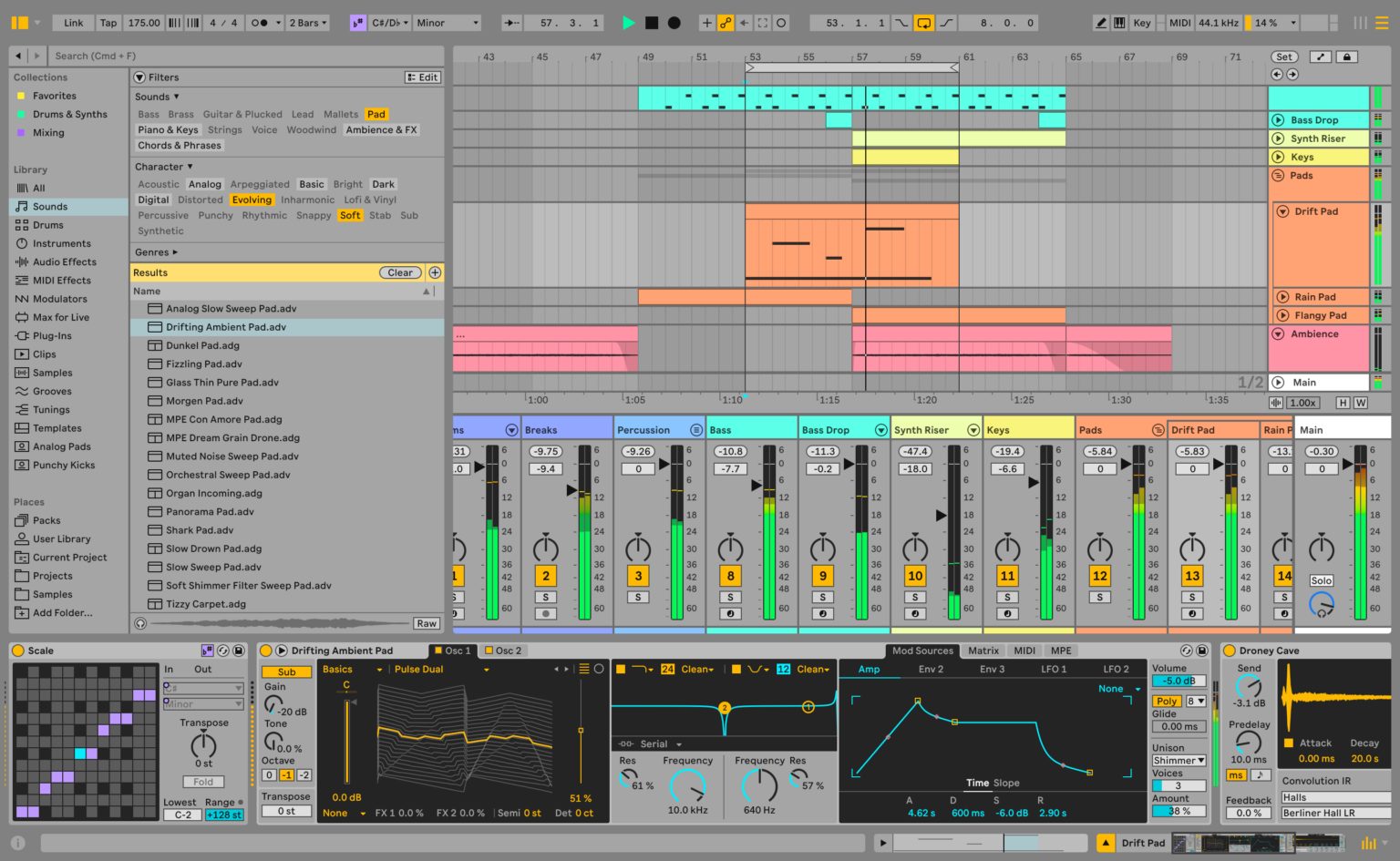
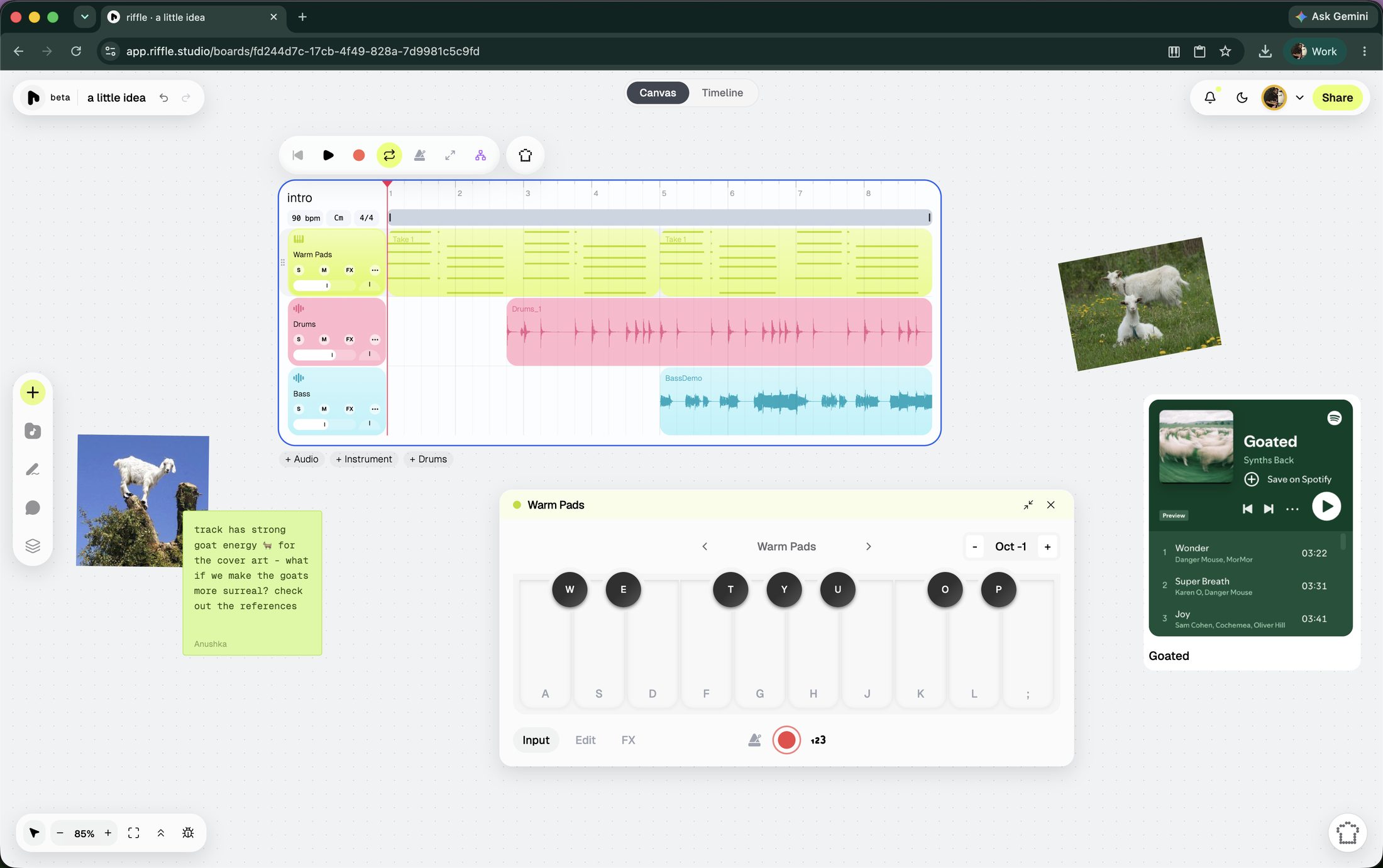
That's not a knock on any one DAW - some are just built to ask for more patience than others, and they pay it back differently. Ableton Live asks for a lot of patience upfront, and pays it back in scale: a large number of sound-shaping tools, plus a flexible system for wiring them together in whatever configuration you want, and effectively no ceiling once the interface stops being a mystery.
riffle asks for none of that patience upfront. It hides its depth inside a handful of tools instead of spreading it across hundreds of them.
Both are real answers to the same problem: how to get from an idea to a finished thing without losing your mind to the interface.
Let's take a closer look at both.
at a glance
| riffle | Ableton Live | |
|---|---|---|
| What is it? | Free, browser-based musical canvas | Professional desktop DAW |
| To get started | Open a tab | Download, install, buy a license |
| Price | Free for early users | One-time purchase - roughly $99 / $349 / $749 for Intro / Standard / Suite |
| Time to your first loop | A couple of minutes | A weekend of tutorials, honestly |
| The workspace | An infinite canvas to explore ideas + timeline view for when you want to lock in | A timeline, plus Session View for looser jamming |
| Depth | Focused, growing fast | Vast - an industry standard |
| Collaboration | Real-time, remote, multiple people on one board | Local-network audio streaming only, as of Live 12.4 |
which one's right for you?
Opt for Ableton Live if you want to:
- A large, mature plugin and device ecosystem, including Max for Live
- Sound design depth, live performance rigs, and offline mixing workflows
- To own a license permanently with no ongoing fee
- The tool most working professionals already use
Opt for riffle if you want:
- A fixed set of building blocks designed to deepen with use
- Real-time, remote collaboration on the same project
- A canvas holding multiple ideas side by side instead of one timeline
- Free access, browser-based, nothing to install
Ableton: industry-grade tool
Ableton Live has earned its reputation the hard way - over two decades of being the DAW that professional producers reach for, on stage and in the studio. Session View alone is worth the respect: it lets you jam and arrange non-linearly, launching clips instead of committing to a fixed timeline, which is part of why so many live performers build entire sets around it.
Ableton comes in three tiers - all three are one-time purchases: you buy a license, you own it. Suite is the only tier with the complete instrument and effects library - things like Wavetable, Operator, and Max for Live - which is what most working producers eventually want.
There's also a free entry point many don't know about: Live Lite, a stripped-down version bundled with a lot of third-party music hardware - audio interfaces, MIDI keyboards, and the like. It's super limited, with a hard cap on how much can be going on at once, but it's a zero-cost way to try the software before deciding whether to pay for more.
So what's the tradeoff you ask? Depth costs a learning curve. Routing, warping, device chains, Max for Live patching - these reward the time you put in, but they also mean your first session probably won't be spent making music. That's fine if you're ready for it. It's a rough ride if you want to get an idea out quickly.
One recent addition: Live 12.4 introduced Link Audio, Ableton's first real step toward real-time collaboration. It lets you stream audio between compatible devices - Live, Push, Move, Note - so a collaborator's playing shows up as a live input you can record. It's local-network only, audio-only, and scoped to Ableton's own hardware and software - your collaborator can't remotely edit MIDI, move a clip, or touch your work from across the sea.
riffle: collaborative musical ecosystem
riffle starts from the opposite assumption: you shouldn't need to commit to a serious instrument just to get an idea down. We also believe complexity doesn't have to come from breadth. The building blocks - recording, a sample and instrument library, arrangement, intelligent and ethical AI - stay fixed, and the depth lives inside what each of them can do rather than in how many separate tools you can find in one place.
riffle is a browser-native modern musical ecosystem, built for how music actually gets made today. Open a board and there are several ways in: record audio into your mic, play a virtual instrument, drag in a sample to set the vibe, jam with the sampler, use/remix a template, or ask sous chef (assistive AI) for a starting point. The canvas also accepts images, embedded links, and notes, so reference material lives right next to the music instead of in a separate tab.
Real-time collaboration is one of riffle's core features. Invite friends or collaborators to edit the board and build a track with you live, or bring someone in as a comment-only collaborator if you're looking for feedback.
Also, your file isn't the only thing you can share - this is the point where riffle stops being just an audio playground and starts growing into a musical ecosystem. When a stack is ready, turn it into a drop: a track or stack shared publicly, straight from riffle. Give it a cover art, and decide whether it stays private, goes fully public, or gets sent directly to whoever needs to hear it. Anyone can listen and comment through a drop link - no download or account required.
Making, collaborating, and releasing all sit on the same surface, instead of getting handed off between three separate apps the way they usually are. Your work isn't trapped in the platform once you're done, either. Export lets you choose specific stacks or individual stems, downloadable as .wav or .daw files, ready for any tool you may want to use, including Ableton.
On the "does the AI just do it for you" question: by design, it doesn't. The sous chef never generates a full song - what it generates are samples, 2/4/8/16 bar loops you duplicate, chop, stretch, and reshape however you like (the underlying model can generate up to 10 minutes, but riffle caps it far below that on purpose). It can split a track into two or six stems, detect tempo & key the moment something's imported, and edit clips directly on the board. Start an empty board by voice instead of typing, if that's faster for the idea in your head.
None of this happens without your say-so: by default, changes the sous chef makes are previewed before they're applied. The same assistant also picks up less glamorous jobs - one-click mixing and mastering, listening to what you've made and giving specific, honest notes on what to change, and more.
You don't have to choose between AI speed and creative control. AI is there when you want it - to spark an idea, fill in a part, get you unstuck, handle the grunt work. If you don't want it, you don't have to touch it. It's a tool you reach for, not the thing the entire product is scaffolded around.
Also, riffle does not and never will use models that aren't ethically trained. The same principle shows up in how sous chef behaves too - it favors surfacing a sound that already exists over generating a new one, and when it does generate, it aims for the smallest, cheapest version.
riffle is currently in beta and free for early users.
already using Ableton?
The only thing that matters is getting your music out. If you've learned your way around Ableton, know it like the back of your hand, and - more importantly - it genuinely inspires you to make music, stay there.
But on days when Ableton starts feeling less like an instrument and more like a job, when the racks and the routing get between an idea and actually hearing it, when you feel a splitting headache coming on - come to where the grass is actually greener. riffle strips things back down to something closer to play: open a board, make a sound, see what happens when there's nothing standing between the idea and the outcome.
And if what's missing isn't inspiration but company, that's the other thing riffle does best. A collaborator can be on the same board with you, editing alongside you in real time, from wherever they happen to be (as long as there's Wifi).
None of this replaces your relationship with Ableton. riffle is another place an idea can start, before it finds its way to the tool that's already earned your trust to finish it.
riffle ships every week - see what we've been working on lately.
faq
Is riffle a real alternative to Ableton?
For a real portion of what a DAW is used for, yes; and its scope isn't limited to early-stage work. Ableton's depth comes from a large, assembled toolkit. riffle's comes from how far a smaller, fixed set of ingredients can be pushed.
Why a canvas instead of a timeline?
Because ideas don't arrive in order. A timeline requires committing to bar 1 through 64 before the shape is known. A canvas allows ideas to sit side by side, forked into versions, with structure decided once it's clearer what the piece actually is.
Does riffle's simplicity limit what an experienced user can do with it?
No - the building blocks are fixed, but the depth available within them isn't. The same small set of tools - recording, sampling, arrangement, the AI assistant - supports both a first project and a much later one; what changes is how far each element gets pushed, not the toolset itself. Ableton's breadth - hundreds of separate devices, deep sound design, live performance rigs - is a different kind of depth, built through a different architecture, and it's not a claim riffle is making.
Can I collaborate with someone in Ableton?
As of Live 12.4, in a limited way - Link Audio streams audio between devices on the same local network, so a collaborator's playing can come in as a live input. It doesn't extend to remote collaboration, and it doesn't allow someone else to edit MIDI or automation from another location.
Can work made on riffle be used inside Ableton later?
Yes. Individual stems or whole stacks export as .wav or .daw files, usable in Ableton, Logic, FL Studio, or elsewhere.
riffle is free while we're in beta.
open a board and make something in the next few minutes.
free · no download · no card required